Showing posts with label learning. Show all posts
Showing posts with label learning. Show all posts
Tuesday, February 16, 2016
Animation for Beginners
These past few weeks have felt like a foreign country to me. The animations that we have learned through After Effects have been helpful but it seems to me that I'm learning a lot slower than the others. I've been watching tutorials and trying to keep up in class, but I always seem to be a little farther behind. I would love to set a goal to be able to get better at animation and After Effects throughout the next few ways. I've gotten used to key frames and simple animations, but beyond that, I need to try a little bit harder and work towards getting better sooner rather than later.

Thursday, January 28, 2016
Drawn to Animation
I, like many, have grown up watching some form of animation, from classic Disney and Pixar films to Spongebob. I’ve always thought about the difference in production time between two-dimensional animation and stop motion animation. The two offer completely different feels, especially two dimensional because of the vast amount of artist styles that can be employed. Well I guess the same can be said about stop motion and and three dimensional and just about any type of animation. The fact that animation can range in not only content but style as well is very interesting to me and a reason I chose to at least learn a a little about it.
I’ve always felt more connected to stop motion animation, only because my skills with a pen and pad aren’t as great as skills with a camera and figure. Growing up the animation in Henry Selick’s “Coraline” or Tim Burton and Michael McDowell’s “A Nightmare Before Christmas" has always mesmerized me and on many occasions I have thought about making them myself. (I’ve realized I might not have the patients for it, although now I’m in an animation course that will be equally time demanding.) Watching these films now I think about the movement and precision and the dedication each person these sets must have. Recently I watch the film, Charlie Kaufman and Duke Johnson’s “Anomalisa" and was completely astounded. When I first viewed the trailer I was amazed to realize that it was stop motion animation and not a live action film. (The trailer also lead me to believe the film would be taking a completely different turn than it actually did, but that’s a topic for another time.) Clearly during the film you knew the character weren’t live action humans from the line that splits the face as well as the the way the characters walk. It was a stunning film as strange as it was.
All in all, even though I seem to be stuck on stop motion, I do enjoy many different animation styles and I am excited to be learning new skills throughout the next couple months that I will hopefully develop beyond this course.
Here Goes Nothing
 |
| I do not intend on attempting this. |
But that's okay. I went to Cinemapolis with some friends a few nights ago and saw Anomalisa--now that looked like it was very, very difficult to make. In other words, I'm thankful that a lot of stuff we're going to be doing will be on a computer with a least a few presets, and that we're not creating sculptures that have to be manipulated to create every single frame of a film.
I know that I need to work on my drawing skills this semester. Before I create good 3D animation, I have to be proficient in 2D animation, which means I have to get better at drawing. I plan on getting my colored pencils this weekend and then starting from there. Arturo showed my Fiction Field 2 class last semester a video where this comic book artist talks about drawing as a skill, not a talent: something that anyone, with enough practice, can get good at. Of course I can't find the video now, but maybe he'll show us in class next week. I'm not exactly sure what to look for as I collect source material for my name animation, but I presume I'll figure that out shortly.
Wednesday, January 27, 2016
Learning from Past Mistakes
Last semester was a quite the learning experience for me in terms of the correct workflow for animation and VFX processes. When we we're shooting Relativity, my senior thesis, one of the more important details of the project was that we had to include several computer screens in the shot (they were hackers, so it was unavoidable). This is something that didn't come up in pre-production, although it probably should have, and so we showed up on set the first day with no plan for rotoscoping the screens.
Someone on set had the idea of taping the corners so that I'd have something to track onto in post. A good idea, especially since the tape was green and easy to distinguish from the surrounding white and black screens. What we failed to think through was the fact that many of the shots had obscured screens or characters moving through them, which makes it a much more difficult process. This could have been shot around, we just didn't think of it in time.
The other detail that we shouldn't have overlooked is the fact that a large number of the shots were handheld. This makes it a lot harder for AE to track all the points, especially when there are characters moving in front of the screens. This shot was particularly difficult, because the characters crossed both screens independently at different times.

That being said, this was by far the most difficult shot. Not only does he move in front of the screen but there is an intense amount of motion blur and shaky camera movements. On top of all that there is light changes across the entire screen, something I didn't notice till the day of the premiere and is currently on my to do list for this semester.

Definitely a learning experience for me, but it gave me a great crash course in rotoscoping which I hope to improve upon this semester.
Someone on set had the idea of taping the corners so that I'd have something to track onto in post. A good idea, especially since the tape was green and easy to distinguish from the surrounding white and black screens. What we failed to think through was the fact that many of the shots had obscured screens or characters moving through them, which makes it a much more difficult process. This could have been shot around, we just didn't think of it in time.
The other detail that we shouldn't have overlooked is the fact that a large number of the shots were handheld. This makes it a lot harder for AE to track all the points, especially when there are characters moving in front of the screens. This shot was particularly difficult, because the characters crossed both screens independently at different times.

That being said, this was by far the most difficult shot. Not only does he move in front of the screen but there is an intense amount of motion blur and shaky camera movements. On top of all that there is light changes across the entire screen, something I didn't notice till the day of the premiere and is currently on my to do list for this semester.

Definitely a learning experience for me, but it gave me a great crash course in rotoscoping which I hope to improve upon this semester.
Friday, December 11, 2015
Learning 3D in Maya and Max
3D modeling and animation is something that I really wish. We have learned a bit of Maya in class, but I wish we could have taken more time to really go in depth with the program and make more 3D animations using it. But thanks to this class I have scratched the surface of Maya, and I am planning as a personal project to learn as much about it as I can to take my VFX to the next level.
But besides Maya, there is another program that I have been desiring to learn and try: 3Ds Max. Its another program very similar to Maya (they both come from Autodesk). And in some ways, I feel like I know how to use this program, and I haven't even used it yet.
I think the reason for this bold claim is because I watched this particular mini series on YouTube from BrandonJLA about learning 3Ds Max. Brandon is famous for being the 2nd in command to Freddie Wong on YouTube back in the early 2010s. They post a lot of cool videos that have a lot of VFX and 3D animations. The programs that they use to make their videos are After Effects and 3Ds Max. Both of these programs are very comment among YouTube and Independent filmmakers. But like any 3D program, many have found it intimidating to learn 3Ds Max. So Brandon takes the audience through the program, how to use it, how he learned it, and some of the pitfalls of 3Ds Max.
I've watched this series of videos a few times, and somehow I feel like I really understand 3Ds Max on at least a basic level. But I just find it humorous that I feel like I know it, and yet I haven't even used it yet. But I am planning to very soon.
The only problem is that 3Ds Max is exclusively on PC. You cannot download it for Mac (unless you dual boot your Mac to run a Windows operating system, but that process can be very annoying). And as a Mac user, thats kind of annoying, especially when Maya can be used on both Mac and PC (which is ironic since both programs come from the same company). But hopefully I can dowload it on my familys PC back home (if the specs are at least the minimum that I need to operate it).
But that is a project that I plan to do over the break: learn more about and practice 3D in 3Ds Max and Maya.
If you want to learn 3Ds Max in the future, I highly recommend watching this mini series from Brandon:
Thursday, October 29, 2015
Lightsabers: The First Effect I Learned in AE
I've used After Effects since 2009, right before I started high
school. I got into After Effects because I wanted to learn how to make my own
Star Wars fan films, particularly involving the infamous lightsabers. I was
inspired by a fellow VFX artist that I found through YouTube named Ryan Wieber. I first saw his famous youtube lightsaber fights titled: Ryan vs. Dorkman. Then I watched his tutorial from WAY back in the day (like early 2000s) on how to
make lightsaber glows in Photoshop and After Effects. It inspired me to want to
get after effects and start making my own effects for my movies.
So I got an EDU discounted copy of AE CS4, and started making
effects for my own videos. It did take some time for me to get use to the technique (let alone the program). I think I watched the saber tutorial at least a dozen times before I was able to memorize it by heart. And then I think it took about a year for me to understand the program in its most basic format.
Here are some samples of my earliest saber effects in AE:
And then as the years went by I kept practicing with AE, and slowly but surely, I got the hang of making a good lightsaber.
Here are some more samples from a few years after the previous ones:
But obviously, I couldnt just limit myself to lightsabers. I had to expand my skills to other effects. So then I started to watch tutorials from Andrew Kramer and Ryan Connolly of VideoCopilot and Film Riot. And I learned how to make all kinds of different effects.
Such as:
This particular post is not meant in anyway to show off anything or be a portfolio. I just wanted to share what my journey to learning After Effects was like, and what I did to learn the program. It took me a very long time to understand the program the way I know it now, and I'm still always learning new things about After Effects that I never really thought about in my earlier days. I'm in no ways a true master like Andrew Kramer is. I also really want to practice making effects and graphics in other advanced programs beyond just After Effects, like Maya (which we are learning in class currently), 3DS Max, Fusion, Nuke, and more.
I hope this post was inspiring in some way to those who might still be a little bit intimidated by AE. But dont worry, if you take some time and practice enough with it, make stuff that you think is cool (like I did with lightsabers), you'll get the hang of it in no time!
Monday, October 26, 2015
Articulate Storyline
As I have mentioned in previous blog posts, I am extremely interested in E-Learning. In my E-Learning course we learned how to create interactive learning modules in a program called Articulate Storyline. This is a program that we referred to as “PowerPoint on steroids” because it had a very similar workspace layout to PowerPoint.
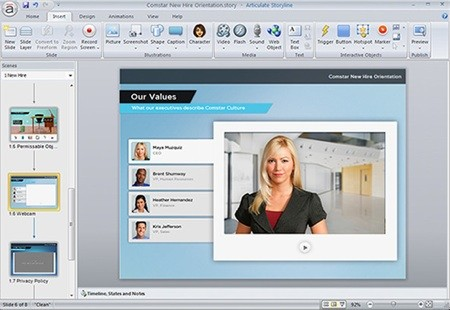 |
| "PowerPoint on Steroids" - Articulate Storyline interface |
The major differences include the fact that you can edit a timeline and keyframe positions of objects on the screen similarly to Adobe Premiere or Adobe Flash. What is extremely interesting about this program is that it exports the project as a folder with HTML, CSS, and JavaScript files. These files can be uploaded to a server and shared as interactive online lessons. A good deal of animation can be used in these lessons as well. Because the modules are interactive, users can click and make things happen, characters, move, or text appear.
Here are some videos of people explaining their animation techniques in Articulate Storyline.
Friday, October 25, 2013
Basics of Motion Design
I came accross this video on Vimeo and thought it was really interesting, it's basically a compilation of clips designed by students at the University of the Arts in Bremen where they were supposed to explain, in each clip, principles of motion design through animation. The most interesting for me is the simplicity of the animations and also the fact that I can identify many of these principles after I started taking M&A.
Some of the "basics of motion design" shown here are:
Timing
Print x Motion Design
Transitions
Suspense
Keyframes
Movement
Negative Space
and many more (check it out)
The Basics of Motion Design from Rogge & Pott on Vimeo.
Some of the "basics of motion design" shown here are:
Timing
Print x Motion Design
Transitions
Suspense
Keyframes
Movement
Negative Space
and many more (check it out)
The Basics of Motion Design from Rogge & Pott on Vimeo.
Sunday, September 8, 2013
How Language Can Effect Our Life
In my first post I talked about the benefits animation could serve for education. I'm going to follow the same train today, sense I recently found another video that beautifully demonstrates how it can make learning much more enjoyable of a task.
(just copy and paste the link – for some reason blogger could not find the video)
http://www.youtube.com/watch?v=US7wLCbZ84M
I thought the combination of information and animation made this an incredibly interesting video. My curiosity was sparked by this video and I found this TED Talk that covers the same theory.
I was very fascinated by the research behind how language can effect your lifestyle. Of course this is still a theory and is not fully proven, but in a globalizing world this can help us further understand the cultural differences we face between different groups and ethnicities.
(just copy and paste the link – for some reason blogger could not find the video)
http://www.youtube.com/watch?v=US7wLCbZ84M
I thought the combination of information and animation made this an incredibly interesting video. My curiosity was sparked by this video and I found this TED Talk that covers the same theory.
I was very fascinated by the research behind how language can effect your lifestyle. Of course this is still a theory and is not fully proven, but in a globalizing world this can help us further understand the cultural differences we face between different groups and ethnicities.
Friday, August 30, 2013
Motion Graphics for Learning
Hello! My name is Canon and I'm really excited to be finally be taking this MG&A class. Seeing as this is a blog I thought I share a quick bit about my blog experience... more specifically, the Wordpress I was working on this summer:
canongoeseverywhere.wordpress.com

It's mostly a collection of photography and traveling adventures I had this summer. By far the most epic summer I've ever had. But enough on that... what I really want to talk about is a fascination I've had with how motion graphics and animation can be used in educational settings. First, I recommend you watch a piece of this TED Talk by Hans Rosling. This video is now about 7 years old so it's possible you've already seen it. His data and information has come under criticism for being over-simplified, but the message behind his presentation is what's most important: data can be boring, but it's visualization is beautiful.
If you're tight on time I recommend watching the first 3 minutes and last 3 minutes. Of course, watching all of it would be best.
Motion graphics and animation have a huge potential in education because... let's be honest, we all love animation. All we have to do is sit back, watch, and enjoy. When you turn education into an animation, the audience becomes much more willing to engage. It doesn't stop with charts and graphs that move around. There is endless room for creativity when it comes to educational animation!
I'll leave you with this final video by Taylor Mali. It's by far one of my favorite poems, videos, and animations all rolled into one. Pay attention to how you can be educated, motivated, and entertained all at the same time. True brilliance.
canongoeseverywhere.wordpress.com

It's mostly a collection of photography and traveling adventures I had this summer. By far the most epic summer I've ever had. But enough on that... what I really want to talk about is a fascination I've had with how motion graphics and animation can be used in educational settings. First, I recommend you watch a piece of this TED Talk by Hans Rosling. This video is now about 7 years old so it's possible you've already seen it. His data and information has come under criticism for being over-simplified, but the message behind his presentation is what's most important: data can be boring, but it's visualization is beautiful.
If you're tight on time I recommend watching the first 3 minutes and last 3 minutes. Of course, watching all of it would be best.
Motion graphics and animation have a huge potential in education because... let's be honest, we all love animation. All we have to do is sit back, watch, and enjoy. When you turn education into an animation, the audience becomes much more willing to engage. It doesn't stop with charts and graphs that move around. There is endless room for creativity when it comes to educational animation!
I'll leave you with this final video by Taylor Mali. It's by far one of my favorite poems, videos, and animations all rolled into one. Pay attention to how you can be educated, motivated, and entertained all at the same time. True brilliance.
Friday, September 14, 2012
Explorations in After Effects
I recently got After Effects onto my laptop, and oh boy. Despite feeling absolutely awful the last few days, I felt kind of like a kid at Christmas getting to use the program and explore some of its features. A slightly dorky kid, but hey, it is what it is.
Naturally, I did what any successful student would: I pressed buttons and played with things until my little MacBook Pro sounded like a 747 taking flight. Then, I realized I'd probably have more straight up directions from a tutorial on YouTube or something of the like, saving my poor computer...and continued on blazing my own trail through the program.
It's kind of funny, but I feel like I learn better by making mistakes and being shown the right way from there, rather than just having the answers to my questions given to me straight away. That way, when I do something right, I've figured it out on my own, and will therefore remember what I did much better. Being instructed is great, but I really do enjoy exploring new things while they're still somewhat mysterious to me (computers and technology are not my forte, to put it simply). I guess the same thing goes for my philosophy on life, make mistakes and learn from them, but that would be another blog post entirely, and I'm considering a very early bedtime tonight.
Looking at other things I've dealt with this way (learning another language, teaching myself better photography, some life lessons, things like that), I can say it's not a bad method for me; in fact, it's usually a pretty successful way of getting things done. Plus, every now and then, mistakes turn out wonderfully, so I'm hoping that a few of my After Effects snafus can become something fantastic.
Anyone else feel they learn best like this? I'm kind of curious.
Naturally, I did what any successful student would: I pressed buttons and played with things until my little MacBook Pro sounded like a 747 taking flight. Then, I realized I'd probably have more straight up directions from a tutorial on YouTube or something of the like, saving my poor computer...and continued on blazing my own trail through the program.
It's kind of funny, but I feel like I learn better by making mistakes and being shown the right way from there, rather than just having the answers to my questions given to me straight away. That way, when I do something right, I've figured it out on my own, and will therefore remember what I did much better. Being instructed is great, but I really do enjoy exploring new things while they're still somewhat mysterious to me (computers and technology are not my forte, to put it simply). I guess the same thing goes for my philosophy on life, make mistakes and learn from them, but that would be another blog post entirely, and I'm considering a very early bedtime tonight.
Looking at other things I've dealt with this way (learning another language, teaching myself better photography, some life lessons, things like that), I can say it's not a bad method for me; in fact, it's usually a pretty successful way of getting things done. Plus, every now and then, mistakes turn out wonderfully, so I'm hoping that a few of my After Effects snafus can become something fantastic.
Anyone else feel they learn best like this? I'm kind of curious.
Subscribe to:
Posts
(
Atom
)