Newton is an awesome plugin for After Effects that simulates 2D physics. As someone who has worked with 3D programs such as Cinema 4D where simulating physics is very smoothly built in and advance, this plugin is a great crossover. Instead of key-framing a ball bouncing for example and trying to make it look as real as possible, Newton allows you to tweak real world physics properties of your objects and simulate real physics. It is great for having things that react to gravity such as objects falling. You can set objects as static and all objects will collide with each other automatically, which is very handy. The plugin has tons of possibilities, which I look forward to exploring, and I have been using some on my third project.
The program is $250 but you can get a free trial and try it for yourself. Here is the website, and here is where you can download it. I highly recommend you check it out.
Game of Thrones is back! That also means we get to see the opening credits again of the kingdoms of the various places in the series. This title sequence started as a concept to help people figure out where everything was since it can be confusing otherwise. It was then pushed to the opening credits and involved an intensive process. Through practical models and eventual CGI Maya models, the structures came alive. It is also interesting to see that the models resemble Leonardo DiVinci concept designs. Art of the Title interviewed Angus Wall who is the creative director at Elastic on the project. The one thing that proved difficult at first was what was beyond the map as the camera moves along. This was solved by making the sun that is seen at the end of the title sequence. If you haven't watched the opening already, I highly recommended it.
I wish we spent more time in this course learning about Maya and all the things you can do with it. I understand that Maya wasn't the primary focus of the course (that's what COMP 290 is for (and it's being offered this coming Fall, if anyone's looking for a couple more credits in their schedule (shameless plug))), but I definitely wanted to incorporate it into my third project somehow. I found this really cool tutorial that describes how to use gravity fields and various other variables to create a simulation of a Newton's Cradle, which I used as part of my project. I figured I'd share it here, just to give a small look at Maya's physics engine. This is probably one of the least complicated tutorials for dynamic animation in Maya I've seen. Most of them are 30+ minutes.
Also, the website that made this tutorial, Studiofourmedia, has some other really cool Maya tutorials on their site. Some of them require purchasing to view, but the free ones are still in-depth and very informative.
I’ve taken a growing interest lately in “behind the scenes” videos for large budget productions. One animated video that I recently saw was a short promo for McDonalds called Always Working. It was a one minute piece made with 3D printed figures and a background full of miniature plastic trees and hills. The reddit user who posted it also included a “making of” video that I found to be very interesting. It shows all aspects of the production process, including some of the character modeling in Maya and compositing in After Effects. The reddit user was an animator on the project and also held a mini AMA (Ask Me Anything) session in the comments of the post. I think that videos like this one give an interesting glimpse of what it may be like to work as a professional animator.
Death to all Bees was created by Studio Smack and was commissioned by Greenpeace NL. This short clip uses 3D modeling to create the Bees seen in the film and then with the combination with perviously shot stock footage creates a humous PSA about exterminating Bees. If it is not clear why exterminating bees would be humorous it is because with out the bees pollenating plants life would be very difficult. Check it out for yourself down below.
Back in the Maya class that I took last semester, our final project was to explore the uses of a tool that we hadn't covered in class, or to find other ways of using a tool that we had already used. For my project, I decided to take a look at how fluids could be simulated in the application. Fluids consist of anything without a defined shape that can be acted upon by forces, so I created some brief simulations of an explosion and fire. Through the use of particle emitters, along with other variable modifiers (such as turbulence and directional constrainers), I was able to create the renders I've included along with this post. Seeing as how we've just started using Maya in this class, I figured I'd talk a little about the experience I've already had with it.
This is an adorable and funny animated short using Maya and photoshop, mixed with premiere. I would not have guessed that this was made in Maya, although it is in 3D I thought it would have been done, at least in part in After Effects. It was made by 3 college students and it was well edited. I wouldn't be surprised to see someone at our school something like this.
Thursday, February 18, 2016
Pixlpit
This is Youtuber and animator Pixl Pit.
https://www.youtube.com/user/pixlpit/
I've stumbled upon a few of this guy's animations on Youtube before and I really like them.
Most of the animations I've seen from him have been where he takes the audio from another Youtuber's video and uses it to shape what he makes, while also often adding in some of his own audio to fill gaps. All of his animations on youtube are 3D and made in Maya. In addition to that, he also renders in RedShift and uses After Effects for compositing.
How I Made: Smoke, Space, and Snow! - Pixlpit Tutorials
At 0:43 seconds he zooms out, and you can see that the landscape he's working is actually a "bunch of pancakes." As someone not very familiar with Maya or 3D animation, I found it very fascinating that he was able to construct this environment from a few of simple forms. Furthermore, I liked that he was able to manipulate how it was viewed by changing the zoom and angle of the "camera" (I don't know how this is done specifically in Maya, but in After Effects there are cameras that achieve this). I don't know how helpful the tutorial actually is, but it's cool to watch his process and see how he makes these things.
Here's another video he did using the sound from another Youtuber's video.
I've never really considered myself good at creative and artistic thinking. I get too bogged down in either why any sort of creative idea that I come up with is either too difficult for me to actually do or too silly for me to seriously consider actually following through on. Conversely, I do consider myself pretty good at learning how to use a particular application with which I could create creative and artistic works, such as Maya and (hopefully) After Effects. The issue then becomes getting those two things to work in tandem, so I don't either have what I consider to be a good idea that's way too difficult for me to actually do or know exactly how to make something, but think that the idea is too stupid and scrap it.
It took me a little while, but in the last class that I took that involved thinking like that (my Maya class), I was able to create some pretty cool stuff when I got my act together. I figured that I'd share one of the only animations that I made there, because I like how it turned out and it could give anyone who hasn't seen Maya before a very small (and very simplistic) glimpse at what can be done in it. The animation is of a toy robot assembly line, because toy robots can be made out of simple polygons and those are easy to work with.
Coming into this Motion Graphics and Animation class, I can confidently say I know nothing about animating. I've never used After Effects or Maya before, but I plan on being able to improve my skills throughout the next few months of the year. Animated movies have always been a very important part of my life, especially Pixar and Disney movies, and I have always found animators to be some of the most talented people. When I was in London, I had an internship at Objective Productions, where one part of it was finding facts about different animated movies, including Shrek, Frozen and Bambi. It was interesting to view the commentary on how they created Frozen, a very recent Disney film to how they animated Bambi, the first Disney film ever created. The content that I viewed showed me the evolution of cartoon animation and how everything used to be drawn by hand while now everything is digitally animated and it can take days just to animate a characters hair! Overall, animation is something that I really admire, and I am excited to become more knowledgeable on how to create certain things for all of the projects that we are going to do in class.
Here is the link to the Frozen documentary I watched:
Above is a link to a short film I found today on Vimeo from Jacob Frey. It was his senior thesis film from the Institute of Animation, Visual Effects and Digital Post-production in Germany. I just find it to be so amazing that people our age are capable of producing 3D animation that looks this amazing. It's a simple short story, but I would say it could hold it's own against anything Pixar or Dreamworks put out in terms of technical quality.
I watched this video last semester in my Computer Art and Animation course. I thought of it as soon as I heard we would be learning how to animate in Maya. It was created to demonstrate what one could do with the software in 1998 (https://en.wikipedia.org/wiki/Bingo_(1998_film).
(Unfortunately, Wikipedia seems to be the only detailed source of information regarding this animation.)
I think this was a great story to tell with animation. The professor who showed this to me
liked to say that animation is an excellent medium to create what's not possible in real life. A good example of this is shown at 0:42. The clown's head begins to grow larger as he yells at our protagonist, creating a much more threatening image. Had this scene been created with real people, it certainly wouldn't have been as fear inducing as it was here. This exaggerated image helps the viewers empathize a bit more with the small man in the chair, by showing us exactly how afraid he is. Not everyone is scared of clowns--even if they're yelling-- but I'm sure anyone would frightened of the giant monster portrayed in the short.
Despite its age, this animation is certainly still a gem and is worth a watch (or two).
3D modeling and animation is something that I really wish. We have learned a bit of Maya in class, but I wish we could have taken more time to really go in depth with the program and make more 3D animations using it. But thanks to this class I have scratched the surface of Maya, and I am planning as a personal project to learn as much about it as I can to take my VFX to the next level.
But besides Maya, there is another program that I have been desiring to learn and try: 3Ds Max. Its another program very similar to Maya (they both come from Autodesk). And in some ways, I feel like I know how to use this program, and I haven't even used it yet.
I think the reason for this bold claim is because I watched this particular mini series on YouTube from BrandonJLA about learning 3Ds Max. Brandon is famous for being the 2nd in command to Freddie Wong on YouTube back in the early 2010s. They post a lot of cool videos that have a lot of VFX and 3D animations. The programs that they use to make their videos are After Effects and 3Ds Max. Both of these programs are very comment among YouTube and Independent filmmakers. But like any 3D program, many have found it intimidating to learn 3Ds Max. So Brandon takes the audience through the program, how to use it, how he learned it, and some of the pitfalls of 3Ds Max.
I've watched this series of videos a few times, and somehow I feel like I really understand 3Ds Max on at least a basic level. But I just find it humorous that I feel like I know it, and yet I haven't even used it yet. But I am planning to very soon.
The only problem is that 3Ds Max is exclusively on PC. You cannot download it for Mac (unless you dual boot your Mac to run a Windows operating system, but that process can be very annoying). And as a Mac user, thats kind of annoying, especially when Maya can be used on both Mac and PC (which is ironic since both programs come from the same company). But hopefully I can dowload it on my familys PC back home (if the specs are at least the minimum that I need to operate it).
But that is a project that I plan to do over the break: learn more about and practice 3D in 3Ds Max and Maya.
If you want to learn 3Ds Max in the future, I highly recommend watching this mini series from Brandon:
Have you ever wondered how a certain movie is made from a technical point of view? Have you ever ask questions like what camera did they shoot on? what did they edit on? Did they use this software or that program to edit and do the VFX? I know I have asked that question about several films.
If you wanted to know the answers to questions like those, then I have the site for you! Shotonwhat.com is an awesome database that shows you what tech and software that they used for certain movies. Its kind of like IMdB for film techies.
Through this site I learned about which movies used which software such as After Effects and Maya. After Effects, while not the Hollywood standard based on the data I saw, is still quite popular and used for a good amount of films, including those from Marvel such as Iron Man 2, Captain America, and the Avengers. And Maya... Maya is basically the standard for 3D and VFX in Hollywood (at least thats what it seems like) based on the LARGE list of movies that say they used Maya in Post production.
The only downsides I would say about this site is that not every category for a film is filled in, so some data is still missing. And Some movies might not actually be up there, although Id say a large majority of movies are on this site. Also I wish that this site would specifically explain what each software or piece of gear of was used for on the movie.
But overall, I really love this site because its very cool to see the technical side of things when it comes to movie making.
I definitely recommend checking it out here: https://shotonwhat.com/
Performance capture is a type of acting involving body sensors that track movement. Cameras at different angles record the movement in order to create a three-dimensional position of the character. The data is mapped on a digital model in 3D software, like Maya for example, so that the digital character moves like the recorded actor.
Below is a video featuring James Cameron and the performance technology used in Avatar.
"We don't have to necessarily believe that they're 100% photo real and we don't necessarily have to believe that they actually exist--but we do have to believe them as emotional creatures," Cameron says on the Avatars in the film.
I find the head rig most interesting. It's a helmet like structure that fits comfortably on the head, along with a camera that captures the facial expression and performance.
I came across this pretty cool video on Youtube the other day. Typically when watching videos you don't see too often people combine live action and animation because it's not an easy thing to do, but this video does it. The concept itself has no meaning but the actual animation is pretty good! Here's the original video:
After I watched that video, I watched how it was made. That was cooler to me than the actual video. At first the video shows how the film was originally shot compared to how they edited it. I found it interesting that they used a rubrics cube for the cube, but everything else the actor had to just guess the size. After that it goes into detail on how each animation was made. I believe the program that they used was called Blender which is a 3D modeling program. I don't really know anything about it though and why someone would use that over Maya lets say. But there were a few things that they did that we learned in class so that got me excited like tracking. Though I don't know how to do that through Blender, I do know how to use it in After Effects! Here's the video on how the first video was made. I highly suggest watching the whole thing:
With lest than 2 months to the release of The Good Dinosaur, I want to make my Title sequence for this film. There's plenty of information avalible about the film online, but I wanted to try my hand at making a short Title sequence for the film. I wanted to share some of my ideas and give an Idea of the style I'm going for:
Firstly, the Two Trailers:
The Trailers give the most amount of information out there, specifically the story. As I blogged about last week, this pixar piece has alot of work put into the terrain and landscape. With all the focus on the Water especially, I wanted to use a mixture of fluid dynamics and 2D shapes to move around the names of the title sequence.
Basing alot of the style on the title sequence from Monsters, Inc.,
my plan is to use basic shapes of ovals and circles to show the characters, and keep the piece almost flat.
I also Want to try making some Text flow away as if it's in a stream:
and I'm pretty sure I found a Tutorial for how to make it work in Maya Here:
Below is a list of all the references I'd like to include in my Title Sequence:
Fireflies
Comet
Arlo the Dinosaur
Spot the Boy
Raging Water
Crystals
rushing past Vast amounts of land and sky.
I'll keep you up to date on the rest of the project as I go.
Wednesday, October 7, 2015
While I do groan about Maya in class I do think it is an extremely impressive and amazing 3D modeling tool. But what could possibly make it better? How about actually building in 3D? This video is admittedly dated, but I haven't seen it before so I thought it would be worth sharing.
What I find most difficult about Maya, besides it's interface (which has gotten better), is learning to work in Z- Space, something I'm sure others struggle with as well. Using the Oculus rift as a modeling tool makes a lot of sense. This is basically playing with play-doh except it's virtual and you get all the tools literally in your hand. Could it be more efficient then working straight off the screen? I'm not sure, but I definitely think it would be a worthwhile investment for 3D animating houses.
Math for Maya: I am really interested in math and computer science and getting to work with Maya was very exciting. A lot of my math courses involved modeling and working with surfaces and shapes in 3D space. I am really intrigued by the calculations and computations it takes to get Maya to work so smoothly. I wanted to research how the program worked.
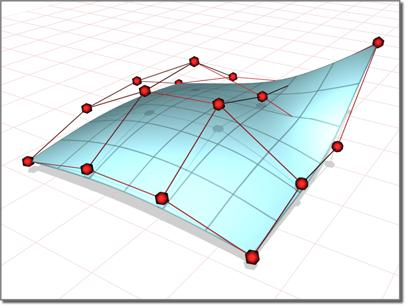
I started with looking into the mathematics of NURBS (Non-Uniform Rational B-Splines). These are parameterized curves that are mathematically represented as either exact conics or piecewise polynomial curves. I was able to read about NURBS in the AutoDesk MAYA manual.
Non-uniform surface formed from control points and control polygons.
Tool for Mathematicians:
In addition to finding that math that makes Maya happen, I found some videos of how Maya helps in mathematical visual representation. These are videos of intense and complex mathematical abstract sculptures.
Math for Artists:
It is helpful when creating graphics or models in 2D or 3D space to have a geometry memory refresh! This is an interesting tutorial about math in 3D modeling.