When I was first introduced to the camera and 3D components of After Effects this past summer I watched this animation as a great reference for some of the possibilities that the program allows.
The animation was done by Daniel Kanemoto for the television series The Walking Dead. Kanemoto is also the creator of Ex Mortis Films and has done other interesting animations for well-know names such as Animal Planet and Nickelodeon.
Kanemoto's The Walking Dead opening sequence was done using 2D drawn images placed in 3D dimensional space, (X,Y, and Z axis') where the Camera moves around within this space. The animation is cinematic, clever, and captivating, and it can all be done in After Effects!
Whenever I encounter something new and exciting I always want to know how it works. I want to know why it was built the way it is or how it can be customized. When using the program Adobe After Effects, I am stunned by how the preset objects (spheres, particles, lights) look realistic and physically accurate. I wanted to know how a computer could generate objects that incorporated scientific factors like light, reflection, shadows, and physics. Through an independent study with Ithaca College professor Paul Dickson, I got answers.
I worked for a semester with Paul to build a Ray Tracing Graphics Renderer. While that may be a mouthful it is actually a pretty simple concept that translates to complicated coding. The ray tracer that I built used object oriented programming. An object, in this case, is a class that has attributes, accessors, and mutators. For example, a sphere object:
attributes: position, radius, color
accessors: getPosition, getRadius, getColor
mutators: setPosition, setRadius, setColor
Image created from my ray tracing graphics renderer featuring planes.
All of these elements together give us an object or blueprint that we can create instances of. Once we have this outline we can have one sphere that is at position (0,0) with a radius of 5 and is red in color, as well as a green sphere at (8,10) with a radius of 2, etc.
Images from my ray tracing graphics renderer before an after
adding a light point in addition to ambient lighting.
In my ray tracer I had lines, spheres, planes, light points, and more. The light points were so that the objects placed in our virtual world could actually be seen. This is where some of the physics of computer graphics rendering came in. I was pretty much able to plug and chug numbers into my program to make the lighting work realistically but there is a lot of mathematics and research that goes into capturing the physics used in graphics renderers.
A ray tracer works by having a given perspective position or “camera” that sends a ray through every pixel of an image. If a frame of the movie is 1080x1920 pixels then the camera sends out 2,073,600 rays, which explains why ray tracing graphics takes so long and takes so much RAM. A ray has a starting point and travels infinitely in a direction. Sending out a ray means that every position between the camera and the last object in the virtual world is checked to see if it intersects with an object. If the ray intersects with an object then it sets that value of the pixel to be the color value of the objects. Lighting and physics may alter the color of the pixel as well.
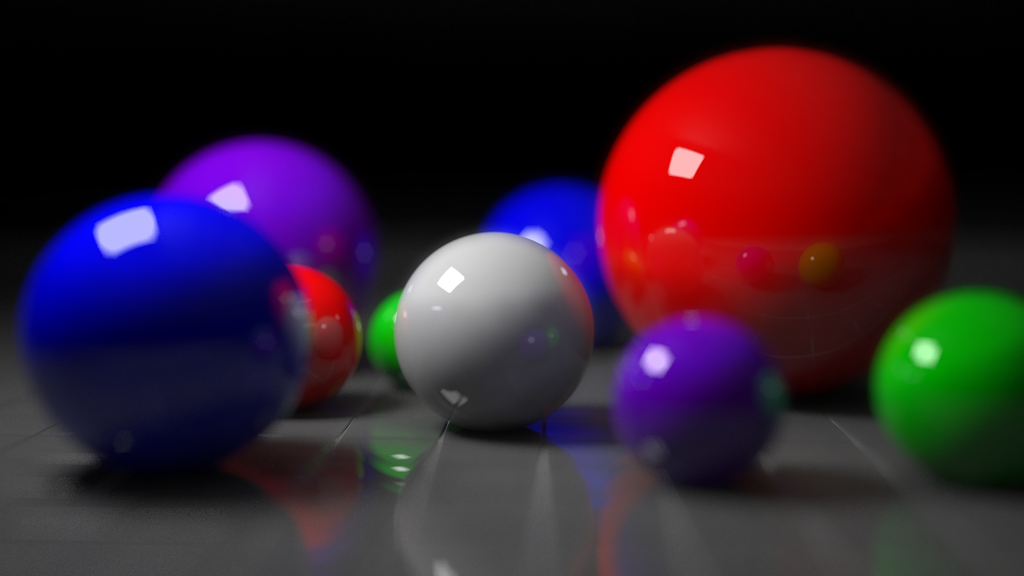
When all of the rays have been sent then every pixel of the image should be colored and you will have final images like these:
Ray traced spheres with added camera effects like focal point and blur.
One Dragon object stores all of the dimensions and parameters for the dragon shape
and minor modifications to the values representing the physics of the light
make the dragon look like it is made of different materials.
Since we are now focussing on the final project of the class I figured it may be beneficial to post a video with some tips on creating green screen effects. The video is quite long, however, it is very in-depth and I'm sure it will be helpful for some of you when working on the project. Some of the concepts in the video have already been discussed in class, such as the use of keylights and camera perspectives.
What do you get when you mix Water flowing out of a tube, and a 24hz sine wave sound from a speaker? Nothing but a weird sound, a headache, and a wet floor.... BUT, what if we shot the water, speaker contraption with a camera shooting 24 fps? Well now you get a crazy looking in-camera effect that will blow people's minds!
In reality, nothing crazy's happening to the water, it's just weaving around a bunch. In camera, however, the water isn't behaving normally. I'm not sure how this works 100%, but I think I have a good idea. Because our camera is only shooting 24 frames per second, we're not capturing all the frames we would normally see. The water is vibrating from the 24hz sine wave, and our camera's capturing 24 fps. Coincidence? I think because we aren't seeing the whole movement of the water, the water looks suspended in mid air.
This works with other frequencies as well. At 25hz, the water appears to be flowing in slow motion, and at 23hz, the water looks like it's going backwards! While this doesn't have much to do with motion graphics, animation, or post-production, I think it's worthy of a blog post. Like Arturo keeps telling us, if you can do something in a camera, do it! I think if you can use this cool trick in an animation, your end result will look amazing!
The camera shown in this video is incredible. Ramesh Raskar and a team of MIT students/professors developed a new camera that can record at a trillion frames per second. Some of the ramifications for this technology are shown, like advancements in medical technologies to help with invasive surgeries, firemen in rescuing survivors from a building. I believe that there are numerous possibilities not discussed in the video, particularly in a military setting. On the other hand us creative types could make some extremely cool motion graphics with this camera. I just wonder what someone could accomplish with a camera like this and creative intent. It is hard to describe exactly how powerful this new technology is, but I feel like the video really speaks for itself. I recommend everyone watches it; this camera could have a big impact on media in the near future!