Showing posts with label iphone. Show all posts
Showing posts with label iphone. Show all posts
Wednesday, September 16, 2015
Updates on Technology
So I know this doesn't really have to do with this class but I came across this video the other day on Facebook and I found it interesting and I wanted to share it with you all. As we all probably know, Apple came out with their new iPhone the other day and everyone is freaking out about it. I honestly can't tell you why, it looks like every other iPhone they have come out with. I'm apparently not the only one that thinks that because Jimmy Kimmel decided to prank people and go out into the streets of Hollywood and tell them that the first ever iPhone is the newest one and people believed him. Take a look:
In the video the reporter asks them what they like about it and a lot of them said that it works faster and that the display is more clear. Now I don't know if they were just scrambling for answers or if they truly thought that. Either way, does technology really improve so much that we need to spend hundreds of dollars on the new fad? If everyday people are ignorant enough to think that this is the new iPhone, does it really make a difference? Like with Adobe for example, they come out with a new update every few months and what's the point? It's not like anything is different. I know the answer to this and it's all about money and marketers know that people will eat it all up. It's silly but true. I know I'm one of them!

Thursday, September 26, 2013
Flat Design and the End of Skeuomorphism
With the launch of Apple's iOS 7, they have signalled a departure from the stale designs of the past. Specifically, they largely abandoned the design trend known as skeuomorphism. Many users have responded positively to the radical change in their phone's operating system. This marks a major blow to the champions of skeumorpist design principles.
Skeuomorphism is the incorporation of ornamentation and elements found in previous non-digital formats. For example, a calendar application that makes use of a leather frame is using a skeuomorphist approach. Or a wooden bookshelf in iBooks...

Critics of skeuomorphism argue that the design trend clutters designs with unnecessary and outdated physical metaphors that can confuse users. Proponents contend that it gives technology users a reference point in the world.
Apple has opted in favor of a flat design chosen by the company's lead designer Jony Ive, after previous lead designer Scott Forstall left in October of 2012.


.png)

Skeuomorphism is the incorporation of ornamentation and elements found in previous non-digital formats. For example, a calendar application that makes use of a leather frame is using a skeuomorphist approach. Or a wooden bookshelf in iBooks...

Critics of skeuomorphism argue that the design trend clutters designs with unnecessary and outdated physical metaphors that can confuse users. Proponents contend that it gives technology users a reference point in the world.
Apple has opted in favor of a flat design chosen by the company's lead designer Jony Ive, after previous lead designer Scott Forstall left in October of 2012.
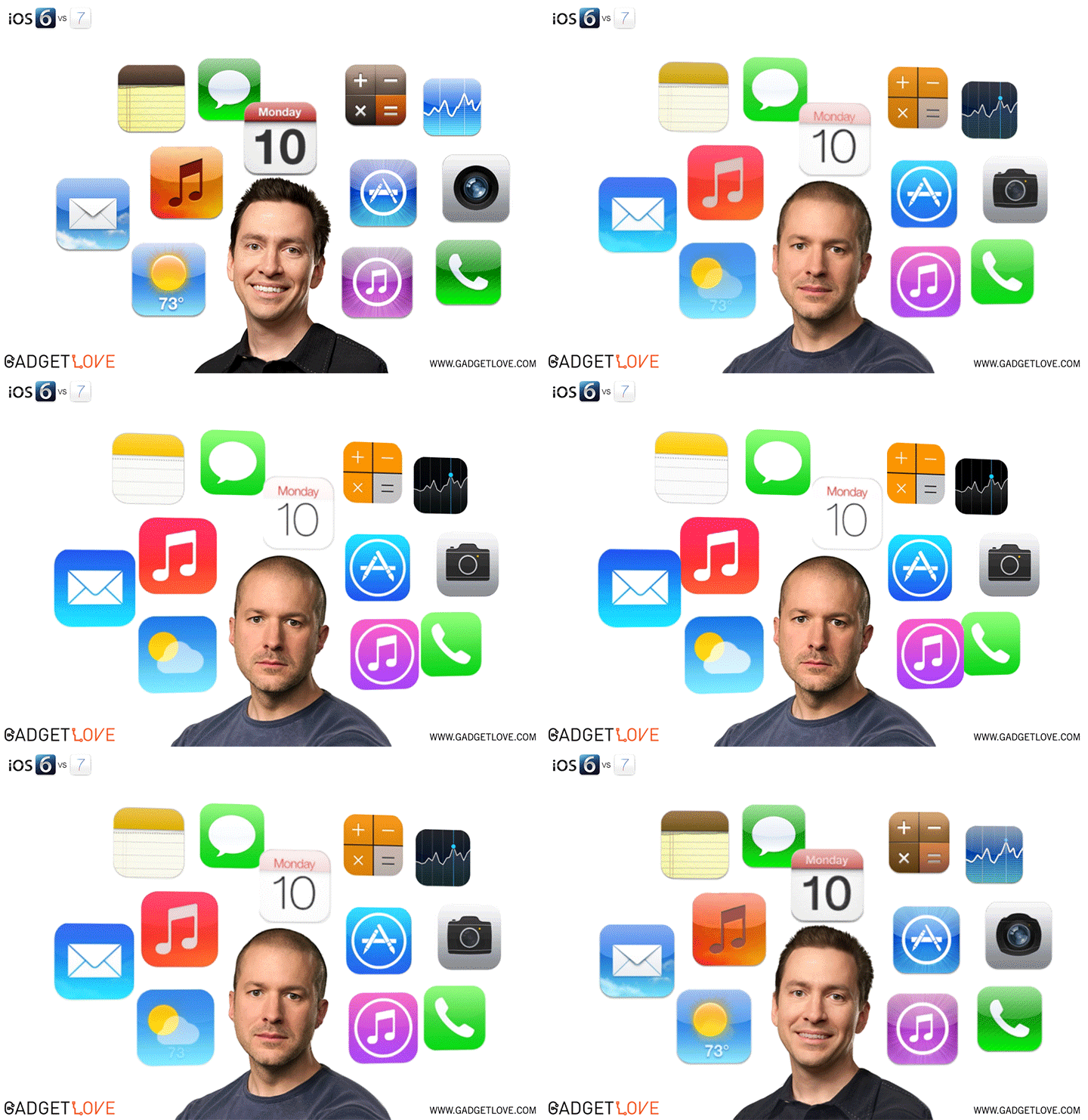
Flat design is a relatively new design concept, propelled to the forefront of talk with the introduction of the Windows Phone in October 2010. It consists of large elements, making use of the full potential of small screens. Essentially flat design proponents argue that usability and modernity are placed at the forefront of the design process.

Looking at the iOS 7's compass app compared to the previous version can give you a direct insight into the design change...
.png)

Friday, September 6, 2013
fake iPhone concept
Obviously this video is quite old but I still thought it was worthy to post here due to some of the effects used in the video. My favorite part of the video was the keyboard segment because it was one of the better fake features. Aside from the concept, the video's effects are nice as they were well made enough to mimc reality. When I initially saw this video, I was impressed with how realistic the edge to edge display looked. This video is a perfect example of how some simple effects can create a nice sequence, and make for an entertaining video without going overboard.
Thursday, September 13, 2012
The New iPhone and iPad Look Pretty Sweet
So have you heard about the new iPhone 5's features? Some say that it will boost the economy while others say it will revolutionize technology. All of these rumors sounded too good to be true so I decided to look up videos and they are all true! The site I found even had the new features for the next iPad as well. Here, watch these links:
I have three words for you: OH EMM GEE. I cannot wait to drive an hour to Syracuse to get in the long line to wait for hours to have both of these beautiful products so that I can live forever in peace and joy until the upgraded products come out and then I have to repeat the process all over again.
Alrighty, lets get serious though. These videos were made by Aatma, an animation and digital content studio specializing in the production of imagery for television, film, advertising and interactive media. Aatma has worked on a number of projects including a joint-campaign for Brisk and Star Wars Episode 1 when it came back to theaters, as well as a handful of viral videos mostly using computer graphics. I remember watching the iPad 3 Concept video a few months ago and thinking that Apple most likely has these planned in the next 7 years or so. I recently rediscovered this video and decided to watch more videos from this studio which are just as equally as cool as these two clips. Aatma has a unique ability to make videos that look so realistic that they're believable and its all very cleverly shot and perfectly edited. I'm looking forward to future videos from them.
I have three words for you: OH EMM GEE. I cannot wait to drive an hour to Syracuse to get in the long line to wait for hours to have both of these beautiful products so that I can live forever in peace and joy until the upgraded products come out and then I have to repeat the process all over again.
Alrighty, lets get serious though. These videos were made by Aatma, an animation and digital content studio specializing in the production of imagery for television, film, advertising and interactive media. Aatma has worked on a number of projects including a joint-campaign for Brisk and Star Wars Episode 1 when it came back to theaters, as well as a handful of viral videos mostly using computer graphics. I remember watching the iPad 3 Concept video a few months ago and thinking that Apple most likely has these planned in the next 7 years or so. I recently rediscovered this video and decided to watch more videos from this studio which are just as equally as cool as these two clips. Aatma has a unique ability to make videos that look so realistic that they're believable and its all very cleverly shot and perfectly edited. I'm looking forward to future videos from them.
Thursday, March 22, 2012
Green Screen From Your Phone
If you don't mind a much lower quality version of a green screen, you can get it right from your iphone with the Green Screen Movie FX app. As long as you're standing in front of a solid colored background, the app will be able to transmit a moving background behind you, or a video of your own if you upload it. It is similar to the application on photo booth where you can put yourself in space or on the beach but with the iphone app, you can control the chroma keys to create a more realistic video and then upload it online.
While it is far from perfect, it might be a useful tool if you are working with a green screen and you have uploaded the background in order to determine where to place your actors to get a clean final product when you import the real thing. Or helpful when trying to pick a background to use, to see which one would look best with the lighting you have.
Subscribe to:
Posts
(
Atom
)